HR management system project is used in companies for organizing employees inside organization. This system will look after employee recruitment, allocating new employees for a project, career module and admin module. HR management system is managed by HR team for managing employee salaries..etc as explained above.
Here we provide Human resource management system project source files and project documentation and abstract for free.
Monday, 29 July 2013
by Rupesh Sharma on 05:03
No comments
Library Management System on Entity Framework
Hi All this is Library Management System Developed on DotNet using Entity Framework.
System Requirements :
windows xp7 or heigher
Visual Studio 2010 or heigher
Note: just open web project in visual studio and create database by entity data model and run the code.
click here below to download this full source code
Monday, 17 June 2013
by Rupesh Sharma on 23:44
No comments
connect to sql database using c#
add these library first
using System.Data;
using System.Data.SqlClient;
create string to connect with database
string str = @"Data Source=(local);Initial Catalog=database;Persist Security Info=True;User ID=username;Password=password";
SqlConnection con = new SqlConnection(); //create object to connect sql
SqlCommand cmd = new SqlCommand(); // create object to send command in sql
DataTable dt = new DataTable(); //create object to store data in temprary
con.ConnectionString = str; //it open connection for database
cmd.Connection = con; // it make connection between connection and command
SqlDataAdapter da = new SqlDataAdapter(cmd); //adatapter object to talk database
con.Open();//open connection
cmd.CommandText = "insert into table(comuln1,column2)values('a','b')"; // specify command
da.Fill(dt);//fire command
con.close();//close connection
//note: if id column is auto then no need to specify id column name to insert
now read database from sql database
create connection as above
System.Data.SqlClient.SqlDataReader SqlDR; // create object to read database
con.Open();
cmd.CommandText = "SELECT column1,column2 FROM table";
System.Data.SqlClient.SqlDataReader SqlDR2;
SqlDR = cmd.ExecuteReader();
while (SqlDR.Read())
{
complainno = SqlDR["column1"].ToString();
}
con.Close();
add these library first
using System.Data;
using System.Data.SqlClient;
create string to connect with database
string str = @"Data Source=(local);Initial Catalog=database;Persist Security Info=True;User ID=username;Password=password";
SqlConnection con = new SqlConnection(); //create object to connect sql
SqlCommand cmd = new SqlCommand(); // create object to send command in sql
DataTable dt = new DataTable(); //create object to store data in temprary
con.ConnectionString = str; //it open connection for database
cmd.Connection = con; // it make connection between connection and command
SqlDataAdapter da = new SqlDataAdapter(cmd); //adatapter object to talk database
con.Open();//open connection
cmd.CommandText = "insert into table(comuln1,column2)values('a','b')"; // specify command
da.Fill(dt);//fire command
con.close();//close connection
//note: if id column is auto then no need to specify id column name to insert
now read database from sql database
create connection as above
System.Data.SqlClient.SqlDataReader SqlDR; // create object to read database
con.Open();
cmd.CommandText = "SELECT column1,column2 FROM table";
System.Data.SqlClient.SqlDataReader SqlDR2;
SqlDR = cmd.ExecuteReader();
while (SqlDR.Read())
{
complainno = SqlDR["column1"].ToString();
}
con.Close();
by Rupesh Sharma on 23:31
No comments
create database in windows application
here is in image given below you can view how to create sql datbase in windows application.
by Rupesh Sharma on 21:41
No comments
READ GROUP EMAIL USING C#.
first Create table for user id and password.
like this below
tablae name : emailusers :
1. id int unique
2. userid nvarchar 50
3. pass nvarchar 50
when Timer starts. //set timer as you need
read all userid and password from table that you create by for loop like this below
create connection and retreive all users with pass in grid.
then
do this code
int a;
a=grid.rows.count; //grid is id of gridview
for(int i=0;i<a;i++)
{
string id =grid.rows[i].cell[0].value.tostrig()
string uid = grid.rows[i].cell[1].value.tostrig()
string pass =grid.rows[i].cell[2].value.tostrig()
readmail(uid,pass); //call read mail function
}
public string (string uid,string pass)
{
//use link below to see code to read email inbox
http://ramveersingh.wordpress.com/2011/05/17/get-unread-mail-count-of-gmail-in-c/
//and insert node data from xml in your table
//and all email will insert in your table from all accounts using this code.
//its very easy.
return uid;
}
first Create table for user id and password.
like this below
tablae name : emailusers :
1. id int unique
2. userid nvarchar 50
3. pass nvarchar 50
when Timer starts. //set timer as you need
read all userid and password from table that you create by for loop like this below
create connection and retreive all users with pass in grid.
then
do this code
int a;
a=grid.rows.count; //grid is id of gridview
for(int i=0;i<a;i++)
{
string id =grid.rows[i].cell[0].value.tostrig()
string uid = grid.rows[i].cell[1].value.tostrig()
string pass =grid.rows[i].cell[2].value.tostrig()
readmail(uid,pass); //call read mail function
}
public string (string uid,string pass)
{
//use link below to see code to read email inbox
http://ramveersingh.wordpress.com/2011/05/17/get-unread-mail-count-of-gmail-in-c/
//and insert node data from xml in your table
//and all email will insert in your table from all accounts using this code.
//its very easy.
return uid;
}
Saturday, 8 June 2013
by Rupesh Sharma on 09:46
3 comments
Send and Receive SMS in .NET using GSM modem
This source code is for Send and Receive SMS in .NET using GSM modem. You can use this SMS Application program to send SMS from your PC using GSM modem connected to your computer. Its complete working project code for sending and receiving sms using C#.Net. You can implement this project source code to your project and this is very much useful for college students.
Steps to Send and Receive SMS in .NET using GSM modem
First, connect GSM modem to your PC.
Check port connection
Open the application.
Configure the port settings.
by Rupesh Sharma on 09:36
No comments
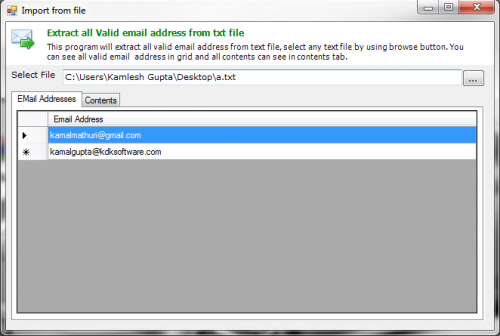
By using this program user can collect email addresses from local .txt files documents or any non-binary file.
select any text file, application will extract all valid email address from text file
Subscribe to:
Posts (Atom)